Automate your post-production workflow
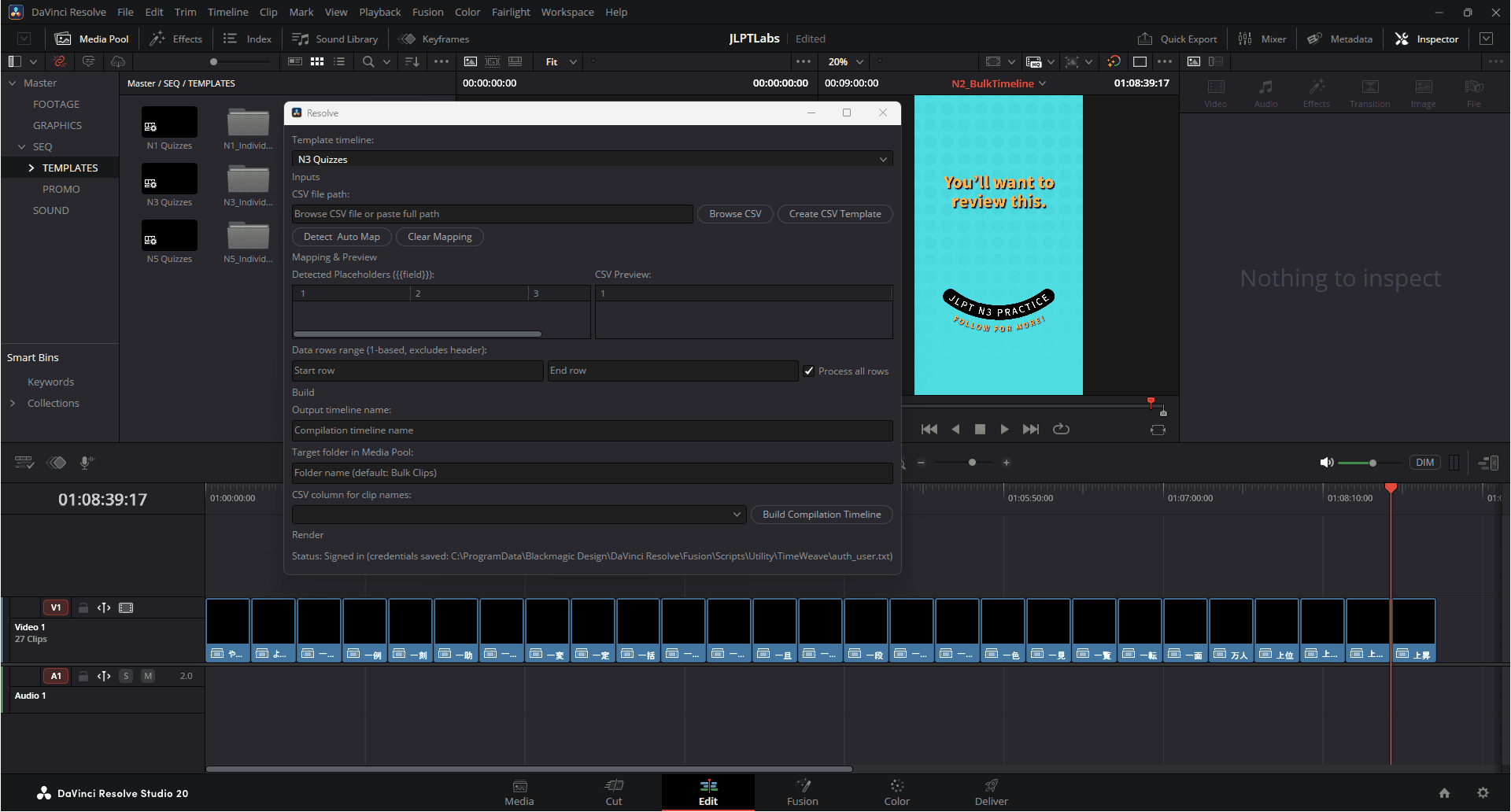
Bring Canva-style Bulk Create to DaVinci Resolve. Import a spreadsheet, feed variables into your template, and export dozens of graphics or clips in one pass.
Core Capabilities
Powerful features for an optimized workflow
Dive into TimeWeave's essential tools. Hover for interactive previews.
Spreadsheet Import
Load CSV headers and rows instantly. Verify your columns with a built-in preview tool before mapping data to your timeline. No more manual data entry errors.
Template Variables
Bind CSV columns to Text+ tokens seamlessly. Create reusable mappings that work across different timelines and projects, saving hours of setup time.
Define variables in template
Text+("{{title}}", "{{subtitle}}")
Image("{{bg_image_path}}")
# Mapped from CSV
Auto Map Placeholders
Intelligent detection of tokens like {{hook}} automatically links matching CSV headers to reduce manual setup overhead significantly.
CSV Headers detected:
- "Title"
- "Description"
- "Footage ID"
Template Tokens:
- "{{Title}}" (Mapped)
- "{{Description}}" (Mapped)
- "{{Footage_ID}}" (Suggest: "Footage ID")
Compilation Timeline Builder
Generate per-row compound clips and assemble a named compilation timeline automatically. Organize clips into target folders with a single click.
Timeline Generation Log:
[OK] Creating 'Clip_001_TitleA'
[OK] Creating 'Clip_002_TitleB'
[OK] Creating 'Clip_003_TitleC'
[OK] Assembling 'Master_Compilation_V1'
[WARN] Missing asset for 'Clip_004'
Quick Start Guide
Download & Install
Get the script from the Downloads page and install it into your DaVinci Resolve scripts folder.
Launch TimeWeave
Open your template timeline. Go to Workspace > Scripts > TimeWeave > BulkCreate to launch the window.
Load and Map Data
- Click Browse CSV and select your spreadsheet (e.g.,
viral_clips.csv). - Click Detect & Auto Map to link tokens like
{{hook}}to matching headers. - Set Name Column to control per-clip naming conventions.
Build and Export
Click Build Compilation Timeline. One clip per row is generated and assembled. Head to the Deliver page to render.
Ready to accelerate your workflow?
Join thousands of editors saving hours every week.